





How AI Is Used in Online Shopping — Explained Through One Realistic Cart
slickpurchase
Sep 15, 2026
You type "caulk gun" into a search bar, click a few results, add something to your cart, and check out. Simple enough. But somewhere between that first keystroke and the order confirmation email, artificial intelligence made at least half a dozen decisions on your behalf — and you probably didn't notice any of them.
That's not a complaint. Most of the time, AI in online shopping is doing genuinely useful work. But it's worth understanding what's actually happening, because once you see it, you shop smarter. So instead of explaining AI in the abstract, let's follow one realistic shopping session from start to finish: someone building a home maintenance cart on a weekend afternoon.
The Session Begins: You Type, AI Interprets
Our shopper — let's call her Dana — needs to reseal her bathroom, patch a crack in the drywall, and grab a few basic tools she's been putting off buying. She opens a browser and types "bathroom sealant and drywall tools."
That phrase hits the site's search engine, and here's where the first layer of AI kicks in: natural language processing. Rather than doing a rigid keyword match, the search algorithm tries to understand intent. It recognizes that "bathroom sealant" likely means silicone caulk, and that "drywall tools" covers a range of items — putty knives, joint compound, sanding blocks. It returns results that reflect what Dana probably means, not just the exact words she typed.
This matters more than it sounds. A decade ago, a search like that might have returned nothing useful, or forced you to try four different queries. Now the gap between what you type and what you actually need is much narrower.
The Results Page: Ranking Is Not Random
Dana sees a list of products. She probably assumes the top results are the most popular, or maybe the cheapest. In reality, the ranking is the output of a machine learning model trained on thousands of signals: how often each product gets clicked, how long shoppers look at it, whether people who bought it came back to return it, whether it's typically purchased alongside other things in the cart she's building.
A product that sells well in isolation but almost never appears in a home-repair cart might rank lower for Dana's search than a product that's a common companion to the other things she's likely to buy. The algorithm is predicting fit, not just popularity.
This is why two people searching the same phrase at the same time can see slightly different results — the model is personalizing based on browsing history, location, and past purchases.
The Product Page: "Frequently Bought Together" Isn't a Guess
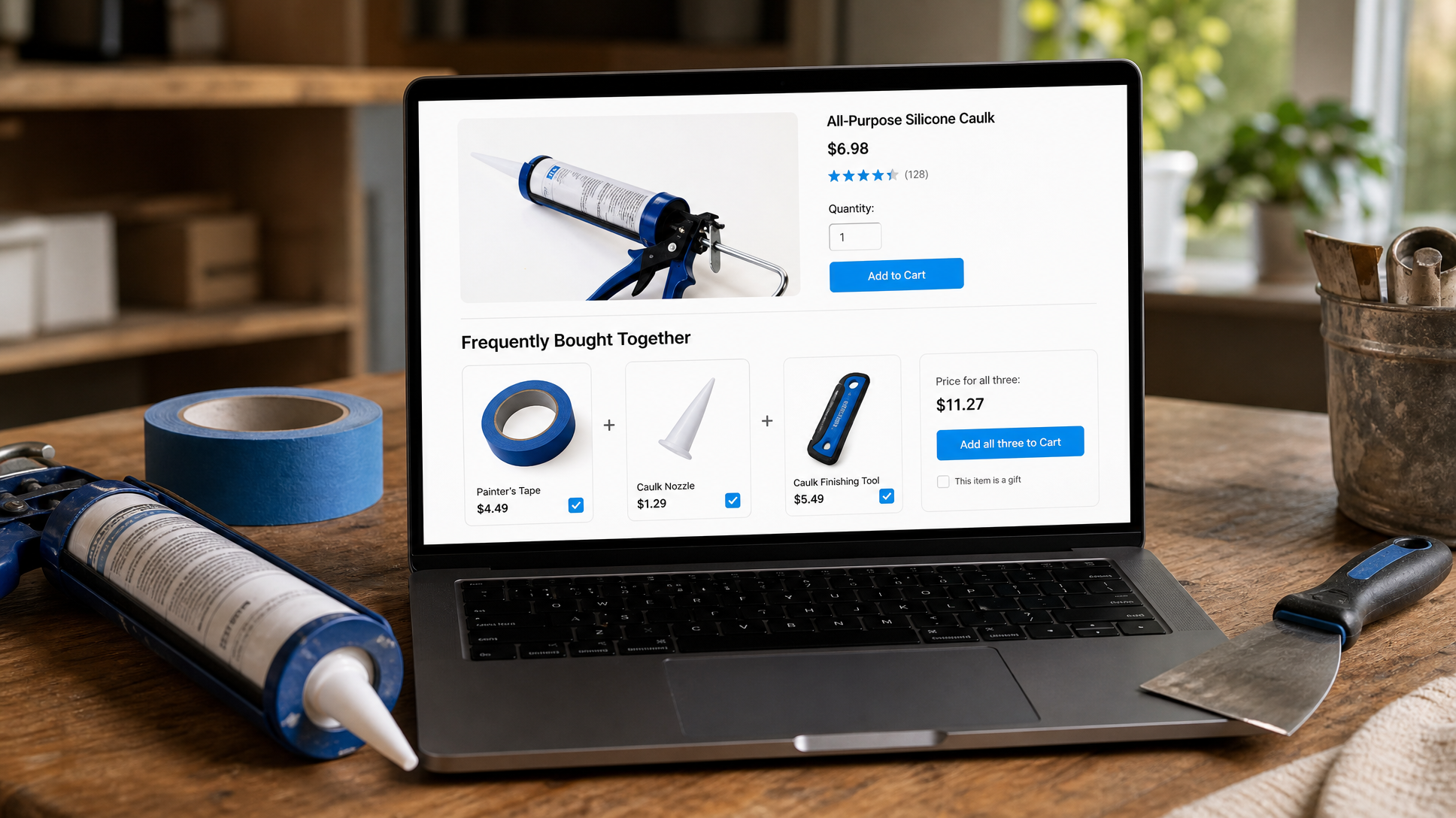
Dana clicks on a caulk gun. Below the main product details, there's a row: Frequently Bought Together. It shows a tube of silicone caulk, a caulk finishing tool, and painter's tape.
That row is the output of a collaborative filtering model — one of the oldest and most effective forms of recommendation AI. It works by finding patterns across millions of orders: customers who bought this caulk gun also bought those three items at a high rate. The model doesn't know anything about caulking as a skill; it just sees the pattern and surfaces it.
For Dana, this is genuinely useful. She hadn't thought about the finishing tool, but it makes sense. She adds it. That's AI doing exactly what it's supposed to do: reducing the mental load of shopping by anticipating what you'll need next.
Price Display: What You See May Depend on When You Look
Dana notices that one of the items she's considering is marked down from its regular price. What she may not know is that on many e-commerce platforms, pricing algorithms adjust in real time based on demand signals, inventory levels, competitor pricing data, and time of day. This is called dynamic pricing, and it's more common than most shoppers realize.
It doesn't mean you're being manipulated — it means the system is trying to match supply and demand efficiently, the same way airline tickets and hotel rooms have worked for years. The practical takeaway: if you see a good price on something you were already planning to buy, it's not always going to be there tomorrow.
The Cart: Upsells That Actually Know What You're Building
Dana's cart now has a caulk gun, silicone caulk, a finishing tool, painter's tape, a putty knife, and joint compound. At the cart stage, she sees a suggestion: a drop cloth. She hadn't thought of it, but of course — she's about to do messy work. She adds it.
That suggestion came from the same type of recommendation model as the product page, but trained specifically on cart-level patterns: what items tend to appear in carts like this one, and what's commonly missing that people later wish they'd grabbed. The model isn't reading Dana's mind; it's reading the aggregate behavior of thousands of people who built similar carts before her.
This is the moment where AI in shopping shifts from background infrastructure to something that feels almost like advice. Done well, it's helpful. Done poorly — or too aggressively — it becomes noise. The difference is usually how well the model is trained on genuinely related products versus just high-margin ones.
Checkout: Fraud Detection Running Silently
Dana enters her payment information and hits "Place Order." In the seconds it takes for that confirmation screen to load, a fraud detection model has already run. It checked her billing address against her shipping address, looked at whether this purchase pattern matches her history, flagged or cleared the transaction, and passed it through.
This is the least visible AI in the whole session, and arguably the most important. It's why online checkout is generally safe even when you're shopping at a store you've never used before. The model is constantly learning what legitimate transactions look like versus suspicious ones, and it's running on every single order.
After the Order: The Email That Knows What Comes Next
A few days after Dana's order arrives, she gets an email. Not a generic newsletter — a follow-up that references the category she shopped in and suggests a few related items: sandpaper, a paint roller, wood filler. These are products that commonly appear in purchases made six to ten days after a home repair cart like hers.
That timing and those suggestions are the output of a post-purchase recommendation model. It's predicting the next phase of Dana's project based on what people in similar situations typically needed next. Whether she finds it helpful or slightly eerie probably depends on how well it reads the room.
What This Means for You as a Shopper
None of this is sinister, and none of it is magic. AI in online shopping is pattern recognition at scale — finding what's worked for millions of customers and applying it to your session in real time. It makes search faster, recommendations more relevant, checkout safer, and follow-ups more useful.
The best version of it feels invisible: you find what you need quickly, you don't forget anything important, and the price is fair. The worst version feels pushy or off-base, which usually means the model is optimizing for the wrong thing.
Understanding what's happening doesn't mean you need to outsmart it. It just means you can recognize when a recommendation is genuinely helpful versus when it's filler — and shop accordingly.
If you're ready to build your own home maintenance cart — tools, sealants, drop cloths, and everything else — SlickPurchase has all of it in one place with free shipping on most orders. No need to bounce between five different sites. And if you want to see how one store covering 20+ categories can actually save you time and money, this post breaks it down.
Frequently Asked Questions
Does AI track my personal data when I shop online?
Most e-commerce AI systems work with aggregated behavioral data — click patterns, purchase sequences, session timing — rather than reading your personal profile in a granular way. What you see as a personalized result is usually the output of a model trained on millions of similar shoppers, applied to signals from your current session. Individual sites' privacy policies govern what data they store and how they use it, so it's worth reading those if you have specific concerns.
Are "Frequently Bought Together" suggestions actually useful, or just upsells?
It depends on how well the model is trained. When the suggestions come from genuine purchase pattern data — items that real customers consistently bought together for a real reason — they're often genuinely useful and can save you a second trip. When they're weighted toward high-margin items regardless of relevance, they feel like noise. A quick gut check: does the suggested item make practical sense for what you're already buying? If yes, it's probably a real pattern. If it feels random, skip it.
Does dynamic pricing mean I'm being charged more than someone else for the same item?
Dynamic pricing means prices can change over time based on demand, inventory, and other signals — but it typically applies the same price to everyone looking at that item at that moment, not different prices to different individual shoppers. Think of it less like discrimination and more like a sale that has a timer on it. If you see a price you're happy with on something you need, buying it promptly is a reasonable move.
Can I turn off personalized recommendations when I shop online?
Most major browsers and many e-commerce platforms offer some level of control over personalization, usually through cookie settings or account preferences. Shopping in a private or incognito browser window also limits the session data a site can use, which generally results in less personalized (and sometimes less relevant) results. Whether that trade-off is worth it depends on how much you value the convenience of tailored suggestions versus the preference for a neutral browsing experience.
Share this post: