




Frequently Asked Questions
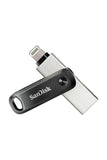
The SanDisk iXpand Flash Drive measures two point zero eight inches in length, zero point four seven inches in width, and zero point four nine inches in height.
The storage capacity of the SanDisk iXpand Flash Drive is sixty-four gigabytes, allowing ample space for photos, videos, and files.
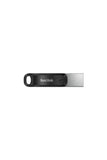
The SanDisk iXpand Flash Drive is available in black, giving it a sleek and modern appearance.
To use the iXpand Flash Drive with your iPhone, simply plug it into your device and use the iXpand Drive app to manage files.
Yes, you can automatically back up your photos and videos using the iXpand Drive app, which is required for this function.
Yes, the iXpand Flash Drive is compatible with iPhone models starting from iPhone five and newer, including various iPads.
To maintain the iXpand Flash Drive, store it in a cool, dry place and avoid exposing it to extreme temperatures or moisture.
Yes, you can password-protect your files across devices, including iPhone, PC, and Mac, for added security.
To clean the iXpand Flash Drive, gently wipe it with a soft, dry cloth. Avoid using liquids or abrasive materials.
If the drive doesn't work, ensure that you have the latest version of the iXpand Drive app and check for compatibility with your device.
Yes, the iXpand Flash Drive typically comes with a limited warranty from the manufacturer, covering defects in materials and workmanship.
You can store various file types, including photos, videos, documents, and music on the iXpand Flash Drive.
Yes, the iXpand Flash Drive can be used with computers via the high-speed USB three point zero connector for quick file transfers.
No, the iXpand Flash Drive is specifically designed for iOS devices like iPhones and iPads, not for Android.
To transfer files, connect the iXpand Flash Drive to your computer using the USB three point zero connector and drag your files.