




Frequently Asked Questions
The Microsoft Surface Dock has dimensions of five point twelve inches in length, one point eighteen inches in width, and two point thirty-six inches in height. This compact size makes it easily portable.
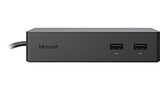
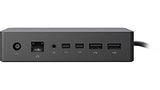
The Microsoft Surface Dock includes two Mini DisplayPorts, one Gigabit Ethernet port, four USB three point zero ports, and one audio out port. This variety allows for extensive connectivity options.
No, the Microsoft Surface Dock is not compatible with all Surface devices. It is specifically designed for Surface Pro three, Surface Pro four, Surface Book, and other select Surface models.
To connect your Surface device to the dock, plug in the Surface Connect cable from the dock into your Surface device. This will transform your Surface into a desktop setup.
Yes, you can use the Surface Dock with multiple monitors. With two Mini DisplayPorts, you can connect two external displays for enhanced productivity.
The external power supply is used to power the Microsoft Surface Dock and provide additional charging for your connected Surface device. It ensures optimal performance while docked.
To clean the Microsoft Surface Dock, use a soft, dry cloth to wipe down the surface. Avoid using liquids or abrasive materials that could damage the finish.
Yes, the Microsoft Surface Dock is safe to use with compatible devices. It meets safety standards and is designed specifically for Surface products.
If your Surface Dock is not working, first check all connections to ensure they are secure. If issues persist, try restarting your Surface device or contacting Microsoft support.
No, the Surface Dock is specifically designed for Surface devices and may not work correctly with non-Surface devices. Compatibility is limited to select Surface models.
The Microsoft Surface Dock typically comes with a one-year limited warranty. This covers manufacturing defects and provides assurance for your purchase.
Yes, the Surface Dock supports high-speed data transferring through its USB three point zero ports. This allows for quick file transfers and efficient device connections.
To set up the Surface Dock, connect it to a power source, plug in the Surface Connect cable to your Surface device, and connect any peripherals through the available ports.
Yes, the Surface Dock is portable due to its compact and lightweight design. It can easily fit into a bag for travel between home and office.
The Microsoft Surface Dock is available in a sleek black color. This design complements various workspace aesthetics and matches other Microsoft devices.