

Frequently Asked Questions
The square hole puncher is made from acrylonitrile butadiene styrene and zinc alloy. These materials ensure durability and effective punching performance.
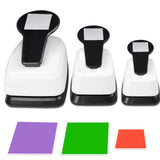
This puncher can create squares in three sizes: zero point seven inch, one point five inch, and one point nine inch. This variety allows for versatile crafting options.
The puncher features a reinforced spring lever design, making it easier to use. This ergonomic design enhances the user's comfort while crafting.
To use the puncher, position your paper under the punch opening and press down on the lever. It's designed for clean and precise punches.
The square hole puncher works best with paper thickness generally less than two millimeters. It can handle various paper types, including cardstock and craft paper.
You can use this puncher for scrapbooking, greeting cards, and other paper crafts. It's ideal for DIY projects at home, school, or the office.
To clean the puncher, simply wipe it with a damp cloth after use. Avoid immersing it in water to maintain its functionality.
Yes, with adult supervision, the square hole puncher can be safe for older children. Ensure they understand how to use it properly to avoid injury.
Yes, the compact design of the puncher allows for easy storage. You can keep it in a drawer or craft box without taking up much space.
If the puncher arrives damaged, please contact customer service for a replacement or refund. They will assist you with the return process.
Yes, the square hole puncher is user-friendly and suitable for beginners. Its simple operation makes it easy for anyone to start crafting.
You can use plain paper, cardstock, craft paper, and EVA foam paper with this puncher. It accommodates a variety of crafting needs.
Yes, this puncher is perfect for scrapbooking. Its ability to create various square sizes enhances your creative options.
Yes, the square hole puncher typically comes with a warranty. Check the packaging or contact the manufacturer for specific details.
If the puncher jams, gently remove the paper and check for any obstructions. If issues persist, refer to the user manual for troubleshooting tips.
You May Also Like